get this error? this file does not have a program associated with it for performing this action. create an association in the Folder Options control panel." just change your default browser. 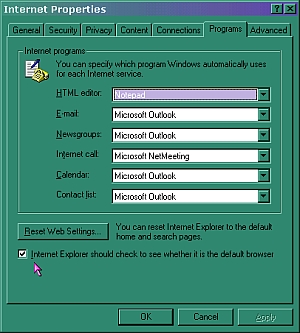 change your default browser- internet explorer is so easy to do this in> just click start, then settings, then control panel, then internet options. on that pop up>>> select the programs tab. at the bottom you will see a box that says "Internet Explorer should check to see if it is the default browser." then click apply, then okay a second option is to us a small program i found that sets the default browser. setbrowser is very nice and simple. it is found about 4/5 of the way down on this page http://www.suttondesigns.com/EnigmaBrowser/index.html (which just happens to be a small full feature free browser ~the 3.6 build ) -repair internet explorer- browser acting weird? now not all versions of windows will allow you to do this. I can on old comp (win 95) but not on new (win me) go figure... >> just click start, then settings, then control panel, then add remove programs.
| 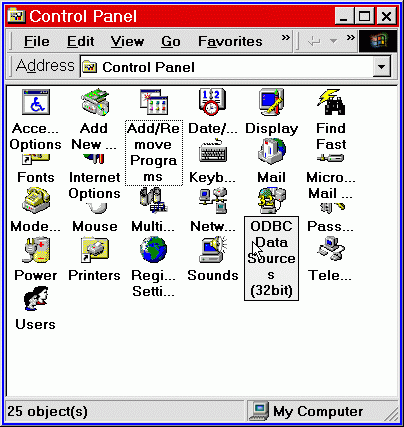 | 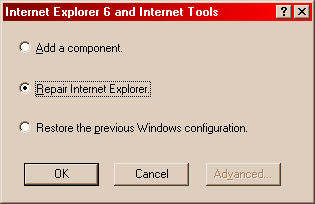 | select Microsoft internet explorer from the list and select remove. you will get a pop up with 3 options. select repair. let it work. | | | 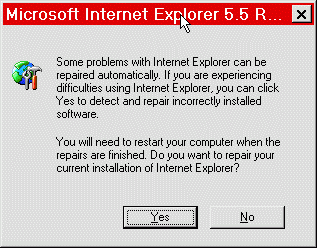 | and it should fix a large percentage of browser problems. on some of the newer OS ( operating systems) you can DOUBLE click the program in add/remove and get repair option. |
-set a new homepage- IE: when open, click on tools (at top) then internet options, on the first tab (general) you will see a box at the top that says address. you can click use current to select the page you are on. or you can type in an address, like / then click apply :) done NETSCAPE: when open, click edit, then preferences. you should see a section that says homepage. again you have the use current page option, or the option to type in a page address, like http://www.myraqs.com click ok when done Opera: when open, click navigation, then set home page. there will be a window homepage option and a global homepage. you will also see a button by both that says use active (this means the currently opened window.) just like with IE and Netscape you can select to use the current window or type one in. then click ok :) done | 