what the heck is this content advisor warning? ! i cant open any web pages !! sometimes  a file can become corrupt, or be affected by something you run across on the net. or someone thinks its amusing to set a password on your browser.

open.your.eyes.open.your.mind....

NewsletterReturn to Index pageForum

if your just browsing through ~ i strongly urge you to save this page to a disc ~ the time you need it, you wont be able to access it on the net! because content advisor stops you from surfing!

take a deep breath and try, because it is much easier to learn a little about where things are on your computer, than to find a utility to do it. but if the information below to fix doesn't seem to have worked?  not brave at all? you can look here  http://osiris.978.org/~brianr/nopics-ie/   he has a small program that sets a new password for you....

now I will assume you are not a child trying to circumvent a parents or schools control of surfing... that would be wrong.

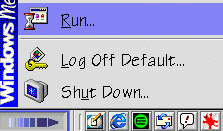
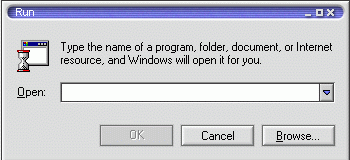
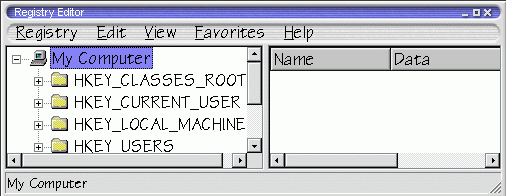
either use a registry editor or click start then run,
then type regedit
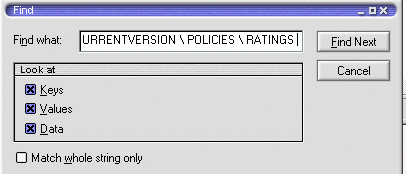
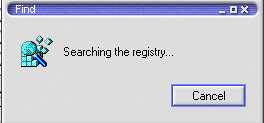
then click edit and find.... and search for
HKEY_LOCAL_MACHINE \ SOFTWARE \ MICROSOFT \ WINDOWS \ CURRENTVERSION \ POLICIES \ RATINGS
it will search your computer for that file

once you find it, you  will see a folder called ratings. (this is also known as the registry key)  you will see the folder ratings on the left side. there will be a lot of  info scrambled on the right. that's the password. right click it and select delete.

not finished yet! now  click start, then programs, then accessories and open windows explorer. look in c:\\ then windows  then system, then ratings.pol is the file you need.  right click and select delete on that file.

now reboot your computer. the next time you open up your browser, it should work fine :) no longer has a pass word set.

Question: why did my computer do this?

 Answer: sometimes another user on the computer may ACCIDENTALLY  set a password, or may be thinks its a funny joke. there are also malicious chat users and web page makers who can send a line of code/ or place a line of code on a web page, and a simple click from you, will accept the changes. This was a problem with an older 5.0 version of yahoo messenger, as well as forced file downloads, and embedded pics.


When you have completed this fix, virus scan at one of the free online scanners. And update whatever scanner you have on your computer ( JUST IN CASE!!)


TIP! this page will not be accessible if you ever get the content advisor warning. it is one of the pages you should save in favorites as being able to view offline, OR click on file, save as.. and save it to your harddrive or to a floppy...  IF you do that, i strongly recommend also saving the other page with the program as well ! and the PROGRAM!!

this way you have the information  handy if you should ever need it.


Later... Make a point to back up your registry once every few  months or so as well ~ learn how here

Content and images copyright ©2000-2004 by Nhyrvana ~violators will be spanked

disclaimer/ terms of use: the use, installation, or application of any of the materials, hints, advice here is solely at the risk of the user. this is a personal site, not a business site. nhyrvana will not be held responsible for any resulting damages, loss or other results due to the usage of the material presented here. if you have any doubts, feel free to search the web for other information. use of this site indicates agreement with these terms..... feel the need to help support nhyrvana? then you can donate a dollar

open.your.mindNewbie2Knewbie NewsletterHelp forums and Fun stuffComp and Chat help