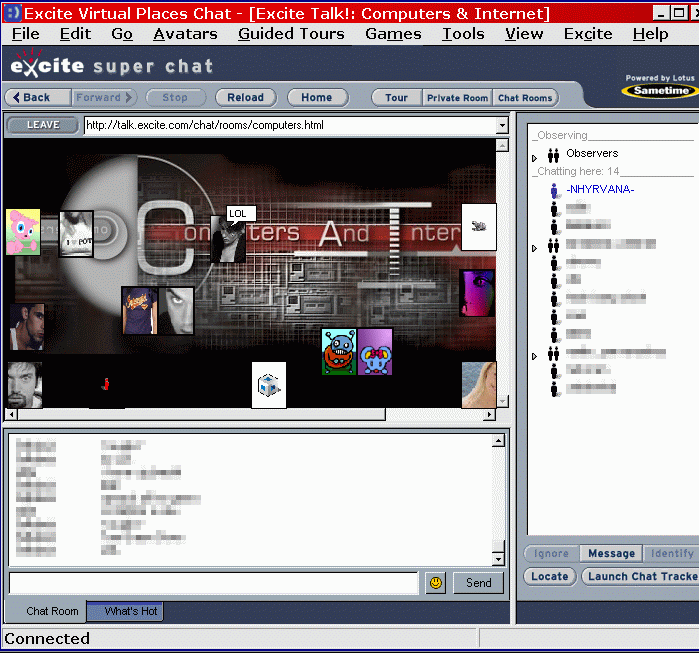
| what does EXCITE CHAT have?-
Excite has 2 chat options : the regular java option> grey screen, black text. boring but usable. the super chat option > download the plug in/messenger and have an enhanced chat with avatars and gestures. about 2.5MB has file transfer in chat there are hosts, tours, chat tracker to find buddies, a messenger service, chat games and more the superchat allows you to chose a text only option, a mixed option, or avatars and "bubbles" only.
Gestures- Gestures are like smileys and waves combined, almost always animated. They are every thing from a kiss and lol, to some awesome ones including popular songs. ( similar to the chatable flash things.) If all you see is ((giggles!!)) it means you don't have that gesture. Ask for it, make your own, or search the web for sites that have them. a lot of these will be zipped up. use winzip or another zip tool to open them. -where do i get gestures and avatars?- Ask your chat friends, search the web, or make them yourself. -File transfers- To send a gesture, an avatar or a file, click on the person's name (the person you're sending the gesture to) and right click. At the bottom of the pop-up, click on Send File. Then you will have the option of sending a file, a gesture or an avatar and you can browse for the name of it within the list. If someone is sending you a gesture, a pop-up appears that lets you refuse, preview or save a gesture. Make sure you save your gestures in the directory (assuming your program files are in C:\) called C:\Program Files\vplaces\exts\gestures. Then they will show up in your gesture list. Careful of small gesture files (4-9 kb ones) these may be boot gestures. So as always ~ be careful who you accept files from -Ignore and pms - Just right click on the persons av and click on ignore. For Java users, highlight the persons name, click on ignore. You can turn off your PMs. Go to the task bar and pick Tools. Then choose Preferences. You will see a little box that says "Ignore all PMs" - just click on that box so that it is checked. You can even personalize the message that is sent when people try to IM you, beside that box where it says "Response Message".
a side note~ i was less than thrilled that the excite chat plug in dropped something called excite platform into my start up. but a quick trip to msconfig, start up tab and unchecking the platform box.... fixed that.
Even on my new super computer ( that's sarcasm folks) i find the the super chat gobbles resources like the old cheeta used to. So about every hour i clear my temp files. So far, no more crashes caused by Excite. more as we wander....... want to see what it looks like? | 
 <~ this is my Excite avatar