for new users just head to www.yahoo.com and click on the chat option.... give it a moment and you should see a log in box, or a notice its connecting to chat. 

( if you already have a mail or groups name on yahoo~ or any other kind of yahoo account, you can use it to log onto chat.) don't have an account? then you will probably be directed to a page that looks like this... if you scroll down and have a problem with the security word embedded on the page, go to start, settings, then control panel, click on internet options, and the advanced tab, scroll down to multimedia and make sure that there is a check in the box to show pictures. guess if need be ~ if you get the word wrong they will give you another word/chance on the next page. i caution you to be careful with the security question info~ this is what is used to recover your account if you lose the password. and don't stray too far from the truth ~ other info is also used if need be to release your account back to you. once you make this account, you can add several profiles to it later if you want to have some different name for chats, groups, mail, etc.
all logged in on the browser ? take a minute and notice a few things.... where your name is, you have a drop down menu to chose names, a link to add/change profile to add a new chat name, and a few options at the top for settings and account information. on the far right, notice the drop down for choosing chat software, you have chat 2.0 (dhtml) and the "more" option, which is the old java chat. - then just select a room from the list on the left and enter a chat room
- all systems go? probably not.
- you will probably get a prompt to download the chat software
if you do not SAY YES! you will not get the chat to load 
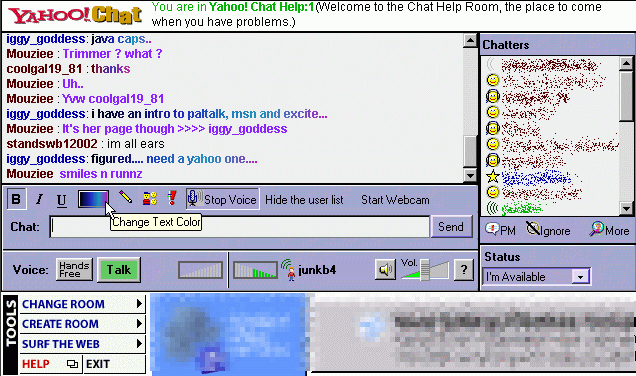
so you finally make it into a room ! the messenger option may look different, but the info is pretty much the same.... notice the buttons above the text line~ make your font bold, italics, or underlined, choose a font color or fade effect, open emotes, start or stop voice chat and web cam. take some time to look around, hover your mouse over options, try some right click options and when in doubt, ask someone...
|