defrag (aka defragmenting ) - Close all open programs when doing this operation on your system. do this right after you scan disc. read this for what is defragmenting, how to defrag, and why you need it.
Close open programs prior to starting ~ see scan disc page if you need help with that.... but should still be closed from scan disc.
From the start menu, go to programs - accessories - system tools - defrag
and click that .
Select the drive letter from the pull down list (arrow)
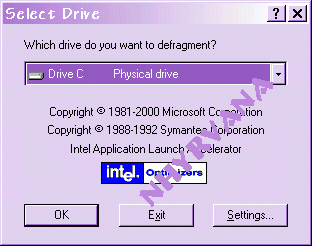
Click the Start Button to start the operation
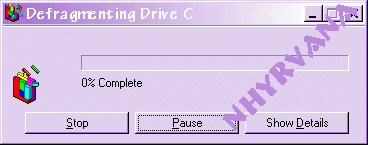
By clicking on the Show Details, you can see all the pieces of the files gathered and being placed in order within the system.
Notice all the white spaces ? ~
this is caused when files are deleted leaving empty holes for new portions of files to be place in - the fragmenting a file or splitting the information over a large area.
don't try to do any thing while this runs. it may take hours! if it keeps restarting, double check for any running programs by pressing cntrl alt delete all together ONCE, look for running programs and close them. (my hd takes at least 3 hours to defrag) or try
ENDITALL ~ a small free program that closes all the running programs.
Again this simple task should be done at about every 2 weeks. and thanks to deepthawt and autumnjade for their help on this tutorial
