bad fades.......- some are just ugly by color..lol
- lol the art is to make good legable faids
- lmao nope..... i have seen them all
- and now alt colorsmmmmmmmmmmmmmmm
- mmmmmmmmmmmmmmmmmmmmmmmmmm
- mmmmmmmmmmmmmmmmmm
- lol this one outa be kinda brigh
bad fonts....... you might be able to read it...... but others.....cant......ask around for legibility ..... matisse and sumdumgoi are examples of the wrong fonts to use in chat. got the idea? .........now how to fix.......scroll down to find the way you chat........ and see the tips :) and if you need colors help..... or cant get just the color you want on the fader.... check here ColorSpecifier.html it has the RGB and hex codes for all colors :) good luck =^..^=
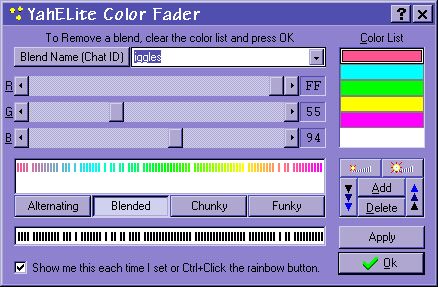
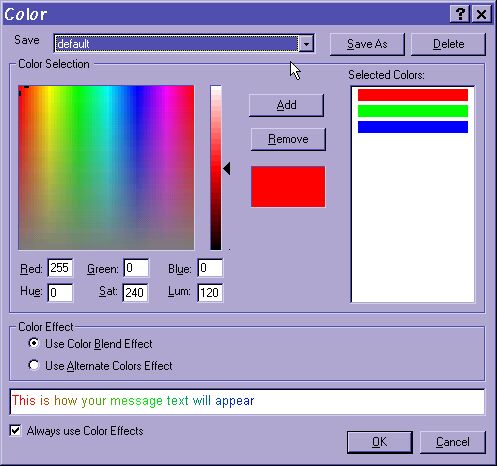
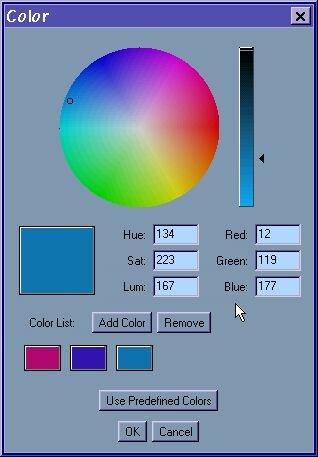
want to use faded text on websites? check cheeta's site for their fader YCHAT client......at the bottom of the screen....click on the blender..... and you will get this pop up..... click on add.... move the sliders to make a color......click add...repeat a few times..... like it? click the button next to blend scheme(... button) and name it....then click okay :) when done CHEETA CHAT CLIENT.......on the tool bar in chat. .top of the screen....is a paint icon....(small yellow paint palette) click that and the built in fader opens....move the sliders. .to make a color....click add to add the color to your fade....when you have 3-5 colors....click save as button....and name it :)click okay when done :) YAHELITE CLIENT....click the rainbow button on the tool bar...and the fader pops up... type in the name of the fade (if you put chat id..that fade will auto load on that id) again..move the sliders and make colors....click add... here you can move colors up and down in the fade or chose funky or chunky options. click apply. then add when done MESSENGER CLIENT ... in chat. click format. then color effects.... remove the colors yahoo has there...(ick) then click add...and move sliders again to make a color.... click add to add more...when done. click save as....and name it..... then in lower left.... click always use color effects. :)JAVA CHAT...... click the color square above the chat line.....on the pop up....either select a different color..... or click the use custom colors option....then move mouse around the color wheel. and when you have a color....click add....and keep the tips noted above in mind :) |