need to clear your history/ address bar? you may have to do all of this to succeed but it shouldn't take more than a few minutes total............

open.your.eyes.open.your.mind....

NewsletterReturn to Index pageForum

this page has some pics to illustrate and may load slow.......you may want to wait and read through before you do anything!!!!

now........lets start with the basics and move on..... and make sure  you try all of it. all the way to the bottom of the page.... you may also need to close browser and reopen it to see the results...

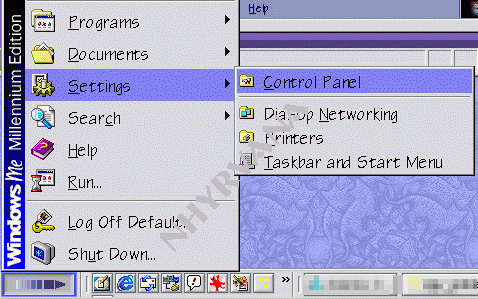
  • click your start button in lower right

  • then select settings

  • then control panel

  • and click on that

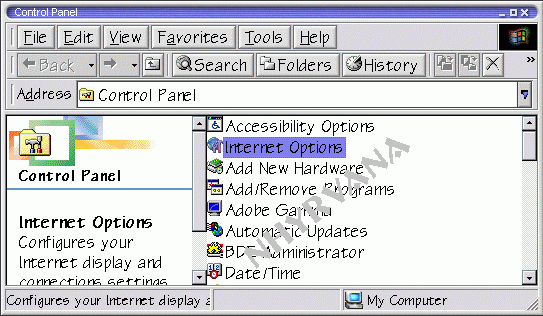
then select internet options from the control panel pop up

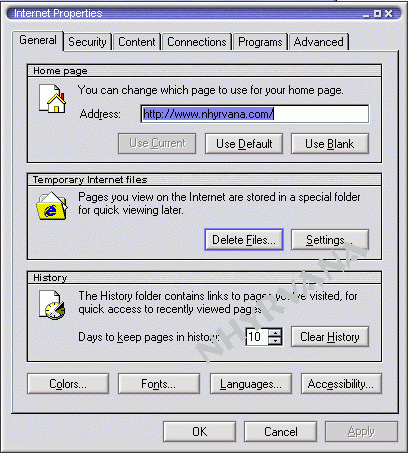
  • in internet options

  • on the general tab

  • click on delete files under the temporary files internet setting

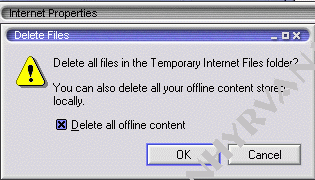
  • and then select all offline content as well

  • click okay

  • let it work

  • may take a minute

  • or several minutes to do this

  • then go back to the general tab and select clear history
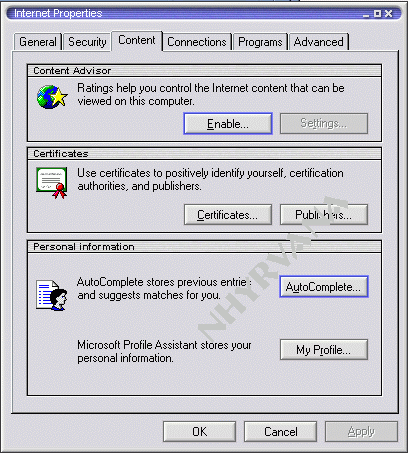
  • again. this may take several minutes to complete then click the content tab
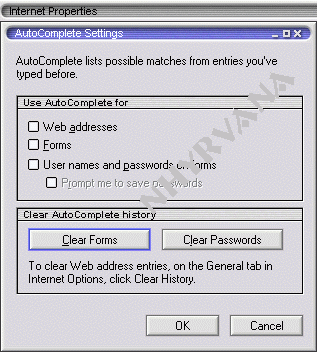
  • and click on auto complete

  • then click on the clear forms button 

  • again...may take a minute or several to clear all the info

  • uncheck any boxes above it to keep this from happening again

then click okay

i see nothing............ *wanders off whistling......

want to see the video? download the how to clear history and clear passwords videos here 

*now no download to see videos. just click the link and view the flash video! smaller! easier to see! and with controls built in so you can replay or pause! these will open in a new window. 

clear history 

clear passwords

these are about 400kb swf files, so they will take a minute to load.


if you still have searched for items in your yahoo search box......log into the my yahoo page...... click content......and uncheck the save yahoo searches box......click okay...... good luck :)   i also like the cleaner for fast clean up of most history files and cookies.


need to just remove one or two links from that address bar? You can look for IE EDIT its 134 kb~  

and to seriously clean your track, try the cleaner cleanup  751 kb  or spyder  ward/index.html  ~


I also recommend that you look at E2C's tweak ui page if you want to clean up your history etc every time you reboot... the paranoia setting will clear all visited links etc... PAY CLOSE ATTENTION TO THE SET UP  INFO THERE!!!

Tweak Ui is a free but NON SUPPORTED tool from MS ~

Content and images copyright ©2000-2004 by Nhyrvana ~violators will be spanked

disclaimer/ terms of use: the use, installation, or application of any of the materials, hints, advice here is solely at the risk of the user. this is a personal site, not a business site. nhyrvana will not be held responsible for any resulting damages, loss or other results due to the usage of the material presented here. if you have any doubts, feel free to search the web for other information. use of this site indicates agreement with these terms..... feel the need to help support nhyrvana? then you can donate a dollar

open.your.mindNewbie2Knewbie NewsletterHelp forums and Fun stuffComp and Chat help