INSTALLATION AND UNINSTALLING OF SOFTWARE

open.your.eyes.open.your.mind....

NewsletterReturn to Index pageForum

go one step farther than the instructions say> don't like it? fine search the web for more help> this is just a suggestion to have a trouble free install.

first it is best to close all programs you have running. this means turn off your firewall, disconnect your isp, turn off antivirus, and no mp3 playing... i even do a cntrl alt dlt once...to make sure nothing is lurking. some people recommend the use of ENDITALL ~ this eliminates possible conflicts 

now, click the exe file, and read what it says....
(it will say close all windows programs probably, now don't you feel smart having already done that? *grins*)
then just follow the directions on installer>
this is usually choosing a directory, and deciding if you want to place an icon on desktop, and do you want to restart now to complete installation.

uninstall !!!!!!
okay, this is not being dramatic or an alarmist here>

IF YOU DELETE PROGRAMS RATHER THAN
UNINSTALLING THEM> YOU ARE KILLING YOUR COMPUTER!!!!!!
(okay maybe a little alarmist)

i am serious though, programs often have files they share with other programs, or even windows.
if you just decide to delete ( for example) yahoo messenger> you take at least 20 dll files with
that folder. and who knows what else is dependent upon them.
uninstall allows the files to be copied, and saved if a shared file.
ready to uninstall?

great, again, it is best to close all programs you have running. this means turn off your firewall, disconnect your isp, turn off antivirus, and no mp3 playing... i even do a cntrl alt dlt once...to make sure nothing is lurking

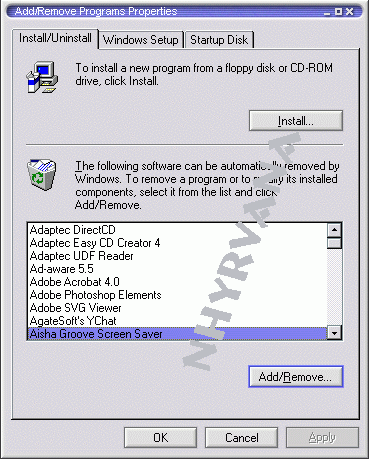
once its all closed >click start/ settings/ control panel and click on add remove programs...

select the program to remove, then click the add/ remove button.

always chose to leave shared files.


most of the time you will need to reboot after uninstalling and may want to run a cleaner program or even scan disc and defrag as well.  i recommend  only uninstalling one program a day, again so you can  trace it if something goes wrong.

easy way to remember? after you UNZIP, rename the file, adding  the date to the end. like winzip becomes winzip9-9-99 or just open notepad and create an install log, or .. use your yahoo calendar  and note there.... 

always feel free to take a minute to copy any terms of service, or disclaimers, or instructions that might be included on the installer. either print screen or copy to notepad :)

NOW... A WORD OF WARNING!!!
be very careful when you install any program. many are co-bundled with another program.
for example> cheeta chat has had gator with it>
and yahoo messenger will add yahoo companion and the yahoo experience (whatever that is) unless you read carefully and select NO

personally after i install things and have rebooted.... i also run easy cleaner to clean out the install files many programs forget to clean  ( do the the registry clean and unnecessary cleans only on easy cleaner after installs if you chose to)

a side note> ( yeah i know another one) i recommend not installing more than one item a day. then if something goes wrong, you can trace it easier, or just uninstall.

IF YOU DELETE PROGRAMS RATHER THAN
UNINSTALLING THEM> YOU ARE KILLING YOUR COMPUTER!!!!!!

back up your registry just in case the install goes bad

use messenger? been told you need to uninstall and reinstall it? 

its easy as pie... go to the control panel and remove it via add/remove programs. THEN go to C:\Program Files\Yahoo! and delete the messenger folder. 

you will lose all settings, all corrupted files, and all stored ims!!  reboot then redownload and install.

Content and images copyright ©2000-2004 by Nhyrvana ~violators will be spanked

disclaimer/ terms of use: the use, installation, or application of any of the materials, hints, advice here is solely at the risk of the user. this is a personal site, not a business site. nhyrvana will not be held responsible for any resulting damages, loss or other results due to the usage of the material presented here. if you have any doubts, feel free to search the web for other information. use of this site indicates agreement with these terms..... feel the need to help support nhyrvana? then you can donate a dollar

open.your.mindNewbie2Knewbie NewsletterHelp forums and Fun stuffComp and Chat help