| Other pages on this site that may be useful..... |
I thought a lot about this....and after much discussion, left it all ONE LONG PAGE. It is easier to scroll up, than try to back track pages to the missed step... Make sure you have checked your chat programs list of KNOWN working web cams and KNOWN not working web cams. if the cam supports 160x120 and RGB of 24, it should work on yahoo..... |
 | Ready? GREAT! this example uses a Viva Cam 10 as the cam being setup. I also have a D-link 100 ClearCase that sets up the same way, and also works. There are DOZENS of cams.. this is the one I use most... all others work about the same way. This particular cam is available at WalMart in the USA for about 40 dollars. It is a dual mode cam, meaning it takes still pics and can be used as a web cam online. When you open that box, you should see the web cam, a usb cable, cd or floppy disc and a booklet. |
 Now what ever cam you have ~ the first thing to do is find the cd and install the software and drivers. Make sure to SAVE this CD! Now what ever cam you have ~ the first thing to do is find the cd and install the software and drivers. Make sure to SAVE this CD!
I even suggest you make a copy of the cd and save it someplace safe. If the CD breaks or is lost, you MAY be able to recover the drivers online.....but it maybe a HUGE download..... So, take that install CD and place in in the cdrom..... when you close the drive, the AUTO run should start the cd by its self....If not, click the my computer icon, then you should see the CD software name by a drive icon.... right click that, and select explore, and look for the setup file. | 
|

| You will usually see an install screen for the software and USUALLY will see a graphics program as well to install. This graphics program is usually the way you retrieve the images from the cam if used as a still image cam. Cams that are WEB CAM only may also have graphics software, video mail software and more. I suggest installing whatever graphics come with the cam, they often carry additional image drivers etc to assure usability. ( translation.. some cams if you don't install the graphics program..... cam doesn't work right. the DLINK is like that... had to install the video mail program as well, even though I won't use it.) |
Some may argue this point..... but I always recommend you REBOOT after installing the software. The choice is yours, but may work BETTER in the long run this way. When the computer is off, this is when I recommend you plug the web cam in.
|
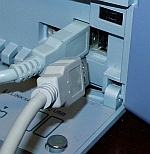
| Some computers will have a front USB port | and some will have a rear usb port. Your choice on where to install | 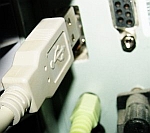 |
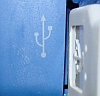 make sure the cable is also plugged into the cam. make sure the cable is also plugged into the cam.
then restart your computer.
|
Start the messenger program of choice here and see if the cam works. No good? Problems? Some possible solutions here....
or try these....
|
 Most problems with cams on yahoo are related to incorrect video format. Most problems with cams on yahoo are related to incorrect video format. Click your computers START button, then SEARCH, select FILES and FOLDERS on your computer, and look for VIDCAP. The file you need is called VIDCAP32.EXE It USUALLY comes with the cam software, but if not, you can download it from yahoo here VIDCAP32. | 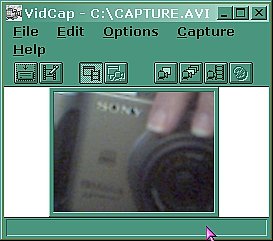
This is the vidcap32 file open |
When you have the vidcap32 file, saved to your computer, open in. Then you will click on OPTION, then VIDEO FORMAT. Then for best chance of working on yahoo, select either 160x120 or 320x240 resolution, and pixel depth of RBG 16 or 24. If you have options that are LETTERS not Numbers.. like GMBC, you will need to try several settings. For more details, check the TRIPLE/ UPSIDE down image page. REBOOT computer and try cam again. |  |
| Some computers will NOT install the cam completely with the software and you will need to manually add the cam to your computer. Look for Scanners and cameras, then select the ADD DEVICE option |  |
 When the web cam is installed correctly, it will look something like this....
|
Using yahoo and web cam says not connected? Make sure you have the correct device selected as web cam source.
| 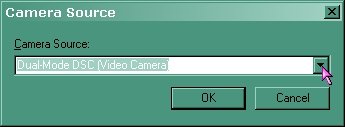 |
This can be found by opening messenger, click on PREFERENCES, then WEB CAM, and you should see something like this.... click on cam source to check it.... you may also need to get the yahoo cam drivers. just click here. accept the little download and you should see your cam image in the box.
|  |
If that cam is still misbehaving, you may need to check for driver updates. * software is OLD by the time we buy it* Quotes KCMAL ~ "Your new cam may have sat on the store's shelf for sometime and the drivers on the CD may not be the most current, it would be wise to check the manufacturer's web site for the newest drivers." So you can check for drivers two ways.... First, you can try windows updates site. Larger driver updates are often found there. but.. in the infamous words of KCMAL...." I wouldn't trust windows update for drivers that much. I wasn't happy with the driver windows update provided for my laptop mouse pad device and had to fallback to original driver I had gotten from the manufacturer's site. " .... and I will say I had about the same experience with my Lucent Modem driver update from the MS site.. Still worth CHECKING though..... there maybe other drivers or updates that get "triggered" by the cam installation. Make a note of any driver updates available and head to the CAM MANUFACTURER site. Best chance though, is to hit the manufacturers site for drivers. http://www.vivitar.com/CustService/driverindex.html would be the link for Vivitar cams....... You may need to look around Google too though..... the DLINK cam did not have a current driver on site at first and I found it on a personal page somewhere.... This should cover MOST of the issues involved with INSTALLING A WEB CAM on your computer. Check around this site or the links at the top for other web cam related issues... and GOOD luck! And. as i previously said on several other pages.... sometimes you CAN get a bad cam....... I bought 4 of the DLINK cams at Christmas 2001 ~ $6 after rebates ty......and the one I opened didn't work. after 4 days of whining i opened a second, worked like a CHARM!.
use web cam to take a pic? |
no i didn't get paid to mention the cams here.. they are the ones i use. |
