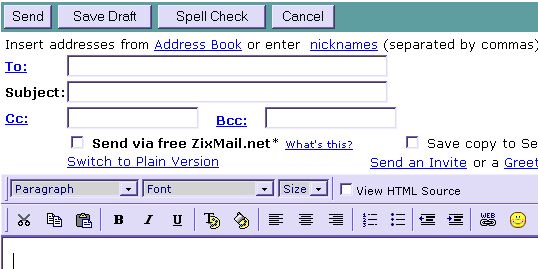
wont pretend this is comprehensive.....if you need more specific help. suggest you try the help link in mail...(lower left).. or try ych
- log into yahoo mail.... http://mail.yahoo.com
- then place the persons email you are sending mail to in the address in the to box , (like nhyrvana@yahoo.com )
- enter a subject..... (like about Christmas) or leave blank.....
- if your yahoo mail id isn't your chat id or you name......its a good idea to put its from 'chatid' or from "jimbojimbob' in the subject box....
cc is carbon copy...bcc is blind carbon copy.... so you can send a copy to someone else....yahoo doesn't save it automatically unless you specify in option .......so if you need to see it later.....click the save copy to sent folder or save draft!!!
then write your text in the big box...... and click send.....done :)
you can spell check if its important.... and use signature or send as html even...if you don't know html....but would like to have a colored background or a different font....or text color at the top. above the text box....switch to formatted version. you have a limited font choice....but lots of text and background colors.... you will need to play around some to get all the tricks down. but its a nice option......
- wondering about signatures? or how to change who it shows as from? on the left side of screen. click options then then click the signature box..... and add a signature....you can add a link to your homepage...a cool link. or something fun like >>>
.:*~*:.¤.:*~*:.¤ peace ¤.:*~*:.¤.:*~*:.
the options section also allows your to change colors and all kinds of cool stuff .....just click mail preferences.... and you can change the who from....navigation bar color. etc....look around and customize the page for you:)
and you can select to use the formatted version, and be able to change how your mail looks when sent, background, font, even smileys:)
add yahoo smileys to your yahoo mail :)
just go to yahoo mail, log in, select formatted version> ( may say use color and graphics.... like below...
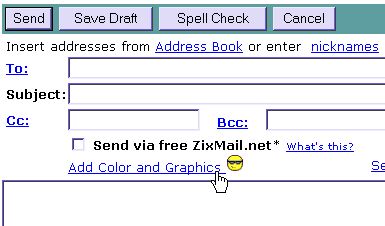
will probably be above the section where you type ~ then on the far right, you will see the smiley button. just select one there.. and add it in your mail. and nopers, the new ones not there yet....
should look like this...