How many times has this happened to you? .... you open a program or window, only to have it immediately drop to the task bar. The window is maximize or minimum only .

open.your.eyes.open.your.mind....

NewsletterReturn to Index pageForum

It seems to happen with almost any program and for no reason at all.  Someone recently told me it was due to some scripting in  pop up and pop under ads. Where did it go to? usually its hiding off screen to the left. WAY off screen. But fixing it is usually simple. Note I said usually ~ this fix works immediately  for 90% of those who try.. Keep trying  ~

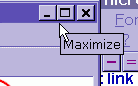
take a second to check the  option in upper right corner.  do you see maximize?  
or restore? if you do not see the 2 square option in the center button, click on the max option ( yes even though the screen is already BIG! )
you may need to click  the restore/max button a few times  and test 

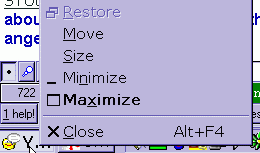
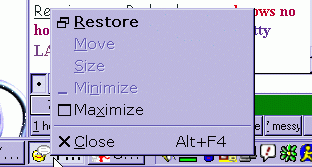
~minimize it with the minimize button. when minimized, right click the item in the toolbar.

move isn't an option?  re-max the window.... click the center button again... then minimize and try it. the key here is to play around with it.  click a few times. and check for move.. eventually it should be an option.

place your mouse over the edge of the screen until you see the double arrow..... then  drag the edge to resize the window back to a regular size. different fixes work for different people..  good luck !

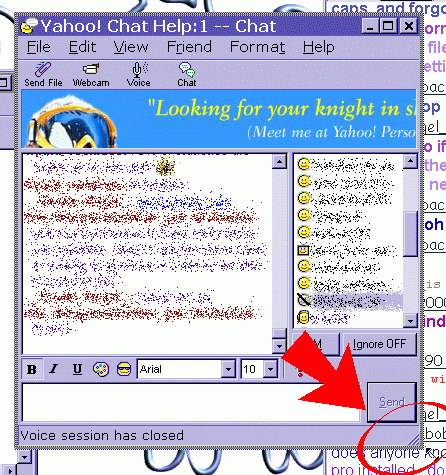
if it is off screen....... when minimized, right click item in the toolbar. then select move, then using arrows on keyboard, click  the up arrow and left arrows until the chat screen comes back.  then resize as you need. 

wanna see the help video? for max with move available option only!

SEE the video help!!!

some have had results by RIGHT CLICKING a blank space on task bar ( that's the bar at the VERY bottom of your screen ) then selecting cascade windows ~ be advised this is a TEMP fix to the problem for most ~ take the time to try the FIX of the problem and prevent its re-occurence

some users have also had success in just clicking on the  item in the tool bar and dragging it up and to center screen , some also try a right click and  drag.... again.. try it a few times if its  picky!! 

Content and images copyright ©2000-2004 by Nhyrvana ~violators will be spanked

disclaimer/ terms of use: the use, installation, or application of any of the materials, hints, advice here is solely at the risk of the user. this is a personal site, not a business site. nhyrvana will not be held responsible for any resulting damages, loss or other results due to the usage of the material presented here. if you have any doubts, feel free to search the web for other information. use of this site indicates agreement with these terms..... feel the need to help support nhyrvana? then you can donate a dollar

open.your.mindNewbie2Knewbie NewsletterHelp forums and Fun stuffComp and Chat help