for many, the pager fault is because some idiot has sent a bunch of junk in a single message. or several messages of junk.
the bad thing, new messenger is supposed to fix this. yeah right :) you cant see which one it is......
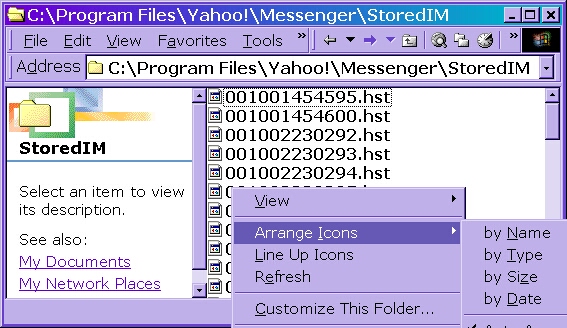
the best you can do is to click your my comp icon on your desktop......then c drive.....then program files...... then yahoo.....then messenger....then stored ims.....
you have two or three options once here......
(opening just gives you server gibberish- tells yahoo to retrieve that message.....no way to tell if its a good message or a bad one )....
- you can right click the folder, select arrange icons, then select by DATE ... they should then be last received at the bottom.
- or select each file there and view properties....check date created and start by deleting the last one ....and retry messenger, repeat until it allows offline view...
- or......you can take a deep breath....and kiss them all goodbye and delete them all.....
- or......if the other ways aren't working......and you have to have the old ones......( just an idea here......) try removing them one at a time. just drag to desk top...and retry messenger until it allows you to check..... this will take more time, but is an option if its very important to save old messages. then drag others back to read.
once done.....i strongly suggest setting messenger to accept pms from friends only or it will happen again
not happening when you check offlines? its possibly two other problems.
problem one ~ if this happens when in chat ~ it means you are using an older version of messenger and some lamer scrolled the room, flooded it with sounds or tried some booter program. close out, clear temp files and cookies, reboot.... seems to fix the problem fine.
problem two ~ ypager error is a common error many see if they updated messy with out updating their other software. specifically windoz. it seems from where i sit, that when the big y updates, its usually related to some updates at M$ as well. So, if you think this is the problem, you can take a trip to windoz updates and make sure that's all current. include virtual machine updates too, it seems to be the most important if you want to view profiles..... then REINSTALL messy once updated.... no need to redownload, just go to c\ program files\ yahoo\ installs. and select the ymsgrie.exe file there. and reinstall.