hopefully this will clarify it all for you........first thing this customization is for yahoo messenger only... this does not customize the emotes in browser chat! now...if you want to customize the emotes you use in messenger chat lets find that emote user file ( emote_user, emote user, emote file. which ever... you decide which to edit.)
there are two ways to find the emote user file ....either work well.
you can click the my comp icon on your desk top .............then click on c drive.........then program files.........then yahoo.............then messenger..........then emote_user.............the icons should look similar to ones below.
    
you may see it as a list instead of icons.....but the names should be the same.
you may have to specify what to open the emote_user file with.........scroll down the list offered..........and select NOTEPAD. only notepad! WordPad is NOT the same!
you can also open the file by opening notepad. then browsing the above path to find it........once its open. ...emote_user should look like this
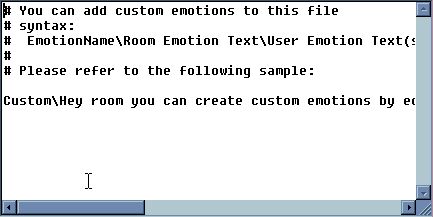
not like this.... this is the emote file... ....but feel free to look at those and get an idea of what to do..........

now, back to your custom emotes.............. just write your own emotes...using the format of EmotionName\Room Emotion Text\User Emotion Text (should contain a %s where you want the user name to appear) just like the example in the file
and remember ~ if you want it to include a persons name ~ you must have all 3 parts in the emote
like\like this\%s likes this << only 2 parts to your emote? the %s WILL NOT WORK
like here are some of mine........
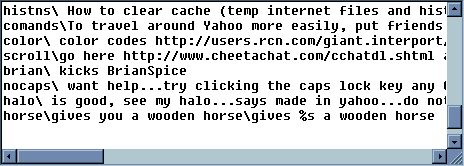
once you have your brand new awesome emotes written, make sure you click the word file->then save as-> and save as a .txt file. its is usually the 3rd choice from left.
or, be sneaky and just click the X . you will get a prompt about replacing the file..... say yes =o) ......if you were in messenger chat while you edited, you will need to close chat, and reenter chat to have them appear on the emotes list
| 