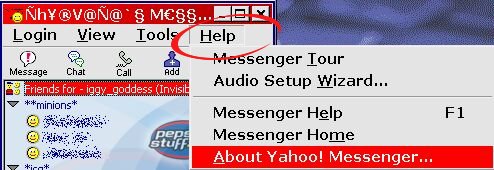
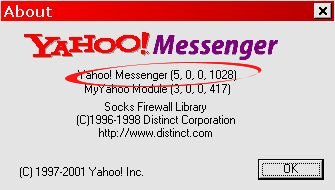
want to see the help video? download the how to check version video file here
see the video here!!!
need to *fix* messenger? you can always rerun the installer, found in C:\Program Files \Yahoo!\Installs , the ymsgrie.exe file.... or you can go to add remove programs and look for yahoo messenger, then double click it on the list.. and you should get the repair option. this will restore default settings, remove any registry edits, etc.
if you don't see an option to join chat ~ possible you are not in a chat version of messenger ( most 4, 0, 0, xxxx versions are chat enabled) you may be on java pager.
don't see web cam? 4, 0, 0 , 9xx version or better for most......
imv? going to be 5,0,0,1018 or so.....
Chatables? needs to be 5.0.0.1036 version of messenger or higher
only see this devil face? its the last one java chat users sees..
see this cowboy smiley?  you have 992~ give or take a build..
see the flag?  you have 1015 or better
see the pumpkin?  then you have 1028 or better
if you see the ghost, you have 1015
see the chicken? 
then you have version 5.5 at least
if you see something like this for one of the above  then you do not have the correct messenger version or you have it installed in other than c-drive ~ and remember.... java will not see all of them! or... your messenger is not installed where it should be :) use the how to find version info ....