| and not knowing what it means.......or how to do it yourself? well hopefully this will clarify it all for you.......first thing to tell you what it is this..........the speaker means a wav sound was played. note: on or about april 25 the
<snd command was disabled on messenger , no idea if it will be back.... it was done to stop a forced room move. thank the ydiots who had been booting..... ( you will hear it when you post, but others may not) the
<snd= is a command..........that means play a sound file........in this case a .wav file. you need to have the wav on your comp, as do others to hear it. ( so if folks don't have the wav.....they hear nothing!! ) you can go to the trouble of typing all that out every time you want a wav to play. but how many times do you want to type
<snd=yahoo> and if you are like me......with more than 250 wavs...... you will want to load your favorites at least into emotes or into your emote_user file. for example> you can add
<snd=bop> to the end of the bop emote and the wav will be heard when the emote is posted in chat. and only one per emote.... you can not have them play two wavs on an emote. go it? no
<snd=doh><snd=bop> at the end of the same emote.( just add the
<snd=whatever> at the end of the emote in the emote or emote_user file) so for example.......... if you put bop\bops you
<snd=bop>\bops %s on the head
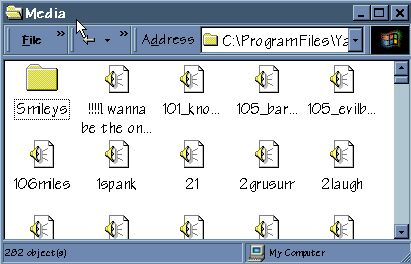
<snd=bop> in your emote_user or even emote file for messenger.....when you use that emote in chat.......then bop wav will play. when you download the wavs...... you will need to save them to disc..... follow this path to save for use in messenger.......... click on c drive.........then program files.........then yahoo.............then messenger..........then media.............then icons should look similar to ones below. if you use a different client save in its sound folder.
    
you may see it as a list instead of icons.....but the names should be the same. after you have them all saved..... and want to look at the list....... follow the same path to view the wavs you have. once its open............media should look something like this
|  or
<snd=yahoo> ....
or
<snd=yahoo> ....