- the first time you load cam....it will take a few minutes!!!!!! be patient!!! you need the files its loading. if you wait and wait, and it isn't loading... you can get the files here or here >
 you will need to unzip it...then run the bat file to install. use this as a last resort. you will need to unzip it...then run the bat file to install. use this as a last resort. - chat 2 has been having problems supporting cams for most. log out.. select the MORE option in upper right.. select java. or use messenger. cams will work there
- this is what we have determined. Yahoo seems to assume we all are diligent in our computer maintenance and updates..... (you can stop laughing now ....) if you have not, and are having ANY problems with cam or voice chat. do the following....
-
- first ~ Please note that the yahoo Webcam service is restricted to users over the age of 18.
- second ~ Yahoo has eliminated the Web Cam rooms. If you still wish to use the webcam, join any room, except a user room. WebCams ARE NOT enabled in user rooms. WebCam works fine in all other rooms
- http://help.yahoo.com/help/us/chat/webcams/webcams-02.html for more info
- WebCam viewer Stuck Loading? To Fix it ... Right Click on the window where it says viewer is loading.... select "Encoding" and then pick either of the two "Western..." ones.. then on the next disclaimer screen CHECK the "Don't show me this again" checkbox and hit OK. That should fix it
- got an ibm cam? yahoo messed up on that> Go to C Program Files IBM PC Camera. 2) Double-click on a program named VidCap32. 3) In VidCap32, click on Options->Video Format. 4) Change the resolution to 176x144 and (more) change the pixel depth to RGB 16 (or 16: RGB16RGB555 - 16). 5) Click OK and then close out VidCap32. 6) Start your videoconferencing program again and see if these changes helped.
- invalid token > Double click the persons name in the chatters list as if your going to send them a PM.. in the PM box tool bar click on "friend" and then click on "view web cam" or try going to c\ windows\ downloaded program files\ and right click and remove the cam viewer and cam uploader files. these files seem to degrade . you can also get the files here
- cams yahoo supports. incomplete list. but basically~ if it supports the 160x120 resolution and 16 and 24 RGB pixels.. then you should be good to go....
Still no good? then start with some comp maintenance, i know i know.. its sucks.. but maybe the problem.. now..... clear cache/temp files... Internet Explorer- How to clear cache (temp internet files and history files) -> Start, Settings, Control Panel, Internet Options, General tab, Temporary Internet Files heading: Delete Files, History heading: Clear History How to clear cache (temp internet files and history files) in Netscape --> Edit -> Preferences, click on the plus-symbol (+) next to the Advanced , Click on Cache, Press the Clear Memory Cache and Clear Disk Cache next..... check windows updates
http://windowsupdate.microsoft.com/ get any and all critical updates. check under recommended downloads/updates for virtual machine. if not there.. then get virtual machine then install any of the updates you get if cam or voice still causes problems.... - make sure you have the latest version of browser chat.
- in c\ windows\ downloaded program files....
- right click
- select properties
- then version
- should say 1.0.0.371 or so ~ if not select remove. then reboot. return to chat and accept latest build.
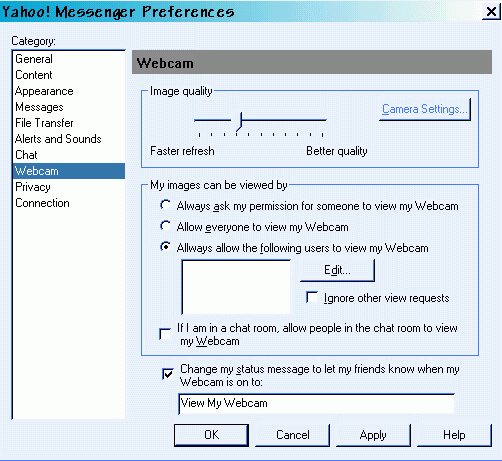
click login~ then preferences ~ then webcam and see this screen~ it is the screen to set up who can view your cam in chat ( on messenger) all updates done? current versions? all installs done? temp files cleared? REBOOT..... AND GOOD LUCK :) |
|
newbie stuff
How to install a web cam..
need to see a running cam?
My Yahoo Webcam
is up about 8 hours a day, and is usually pointed at a cat or the window.
- when you look at the user list in the room......how do you know who is in what...
- when you look at the room list. you see several kinds of faces
- this is
 in voice chat in voice chat - this is
 is on web cam is on web cam - exact same icons on messenger and java!!!!!
- don't see the icons? then they are NOT IN VOICE OR ON CAM!
Cam image upside down and in triplicate? no ya haven't been cloned..... just find the VidCap32 program that cam with your cam, click on options, then video format. change the resolution ( try 160x120, if that try 176 x 144 ) and check RGB ~ if its 24, try 16, if 24 try 16. click okay then close out the vidcap program. restart cam program and no more triple you!
in messenger?... - first update your messenger
- click help/about....if you don't have 4.0.0.992 you will NOT see cams on messenger
- update here if not~ webcams.html
make sure you have no other programs running.... close real player, winamp, quicktime, netsonic, & net captor. also make sure no other messenger or cam program is loaded when you try.....and do not turn on music when you try!!! and nope.. sorry no idea about the zoom problem or the turbo button .... BUT. A SIDE NOTE..... THE WEB CAM HELP PAGES FOR MESSENGER ARE MUCH MORE COMPREHENSIVE THAN THOSE FOR BROWSER...... and do realize you can get a bad cam ~ i spent 4 days trying every fix.. dozens of times.. vidcaps, twain, drivers, uninstall, reinstalls. and finally.. i opened another cam up ( had bought 4 on sale at Christmas ~ so i opened my bro's present to try it :) turns out the one i opened up first, was bad... so i returned it. cam worked great !!! btw its dlink c100 clear case.. after rebate ~ $6 US funds.. not bad huh... more triple you =o) ~thankies to slykk_1 for making me dig for that fix
use avi or other source for cam Andy's cam grab.. |
|
Content and images copyright ©2000-2004 by Nhyrvana ~violators will be spanked disclaimer/ terms of use: the use, installation, or application of any of the materials, hints, advice here is solely at the risk of the user. this is a personal site, not a business site. nhyrvana will not be held responsible for any resulting damages, loss or other results due to the usage of the material presented here. if you have any doubts, feel free to search the
web for other information. use of this site indicates agreement with these terms..... feel the need to help support nhyrvana? then you can donate a dollar
|
