is everything all scrunched on your screen? or looks weird? you might check your display settings. installing a new program or uninstalling on can sometimes change the settings. or even doing routine updates. a recent driver update messed my colors until i reset  them in display properties.

open.your.eyes.open.your.mind....

NewsletterReturn to Index pageForum

-change your screen properties-

so >>> how to fix ? you can right click an empty section of your desktop, then  select properties. 

.

 select the settings tab. 

.

the setting available are  640x480  800x600   1024x768  and  1280x1024  

.

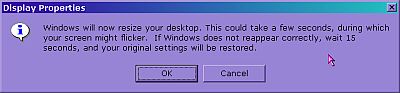
personally i have mine set to 1024x768 for the ease of having multiple windows open and being able to see them all at that size. however, they are small! most programs look fine at 800x600.  if you want to try a larger setting, just move the slider on the left of the pop up on the setting tab. click apply, it will ask you if you want to change the settings. 

.

then it will black out as windows changes the settings, then you usually have an option of accepting or rejecting the new setting. 

this tab is also where you can change form 256 to 16 or even 32 bit colors. be careful messing with that, you often change this after updating  video drivers.

want to see the video? download the screen settings help video

TIP! ~> IF the setting is not acceptable to your computer, and all you see is static.. DO NOTHING! and  it should revert. If you do nothing and it does not revert, you may need to shut down ( power button ick!) then start in safe mode. ( hit f8 when comp restarts. after the first screen, before the windows splash... you may need to do that more than once)  then restore your old  display settings, scan disk and reboot. you should have old settings back on restart and no safe mode. check for driver updates before you try to adjust it again.

HEY! nice faded background for your desktop! how can i get that?  check the background page :) or.. just grab the Rainbow fade strip

TIP! ~> Getting a new video card? 

before you uninstall your current video card, drop down to 640x480 at 16 colors. Then reboot, to insure you are at that low setting, and then uninstall your current card. The reason for this is, when you put your new video card in, it will try to prompt you for configuration stuff, and if you cant read it, due to the settings being "high", then you are hosed. Follow his reasoning? It may be that your newer card could instantly understand the old high graphic settings, but 640x480 x 16color is always safe and standard.

thanks DogSurfer!

Content and images copyright ©2000-2004 by Nhyrvana ~violators will be spanked

disclaimer/ terms of use: the use, installation, or application of any of the materials, hints, advice here is solely at the risk of the user. this is a personal site, not a business site. nhyrvana will not be held responsible for any resulting damages, loss or other results due to the usage of the material presented here. if you have any doubts, feel free to search the web for other information. use of this site indicates agreement with these terms..... feel the need to help support nhyrvana? then you can donate a dollar

open.your.mindNewbie2Knewbie NewsletterHelp forums and Fun stuffComp and Chat help