how to make a yahoo messenger skin..... basic info..  yahoo changed the format of the toolbar, now all lil images.... easier.... ****note this needs UPDATED they have changed the way it is done.

open.your.eyes.open.your.mind....

NewsletterReturn to Index pageForum

here goes..... this isn't perfect......and is best used in conjunction with yahoos help page for messenger themes too......but just to give you the general idea of making your own skins for 'mess'enger

TOOLS: you might be able to do most of the graphics editing with the paint program ......but if you have images that aren't bmp you will need another program. i suggest ifran....its small and effective and supports almost all file types and converts fast! other programs will work as well....just my personal preference.

all images used will need to be in a bmp format.........

the general files you will make would be 

  • friend_toolbar.bmp(192x135 pixels) ~ changed to several individual images... grrrrrr ~ look in the default skin folder to see all....
  • background.bmp(about 200x200 pixels)
  • online_user.bmp (16x16 pixels)
  • offline_user.bmp(16x16 pixels)
  • idle_user.bmp(16x16 pixels)
  • busy_user.bmp(16x16 pixels)

some extra images you can include are friend_root.bmp(16x16 pixels)/ friend_groupopen.bmp(16x16 pixels)/ and friend_groupclose.bmp (16x16 pixels)

any image you find or make can be used on messenger...just change format to bmp and make sure its the correct size :)

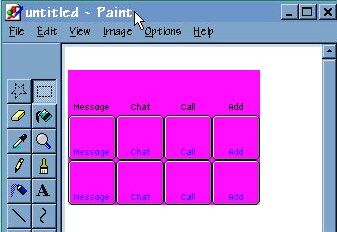
now......... there are a few ways you can begin-> i open up paint......then i click on edit.......paste from.......and import a template i made.....( all i did was import one of the generic friend tool bars already in messenger...then used the paint dropper. and matched the color ...then painted over the pics and images already on it...and saved that for later use..... if you find an easier or better way...great!!!!!

however you do it....... eventually you will have paint open and see something like this

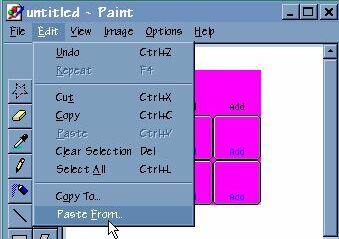
then you click edit......and then  paste from

then you will get a pop up screen allowing you to browse on your comp for the image(s) to place on your tool bar......

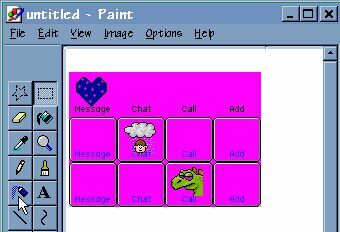
just move the image around until its where you want......and then repeat with other images

if an image is too large for the space...just place mouse on the dotted line until you get a double arrow <--> and resize carefully!!!!! if it gets messed up...don't worry...you can always click edit......and then undo....and then grab the image again.

when its all finished>>> click file/ save as and save it with a name you will recall....... then reopen the file in your other graphic program......and crop to 192x135 pixels.......and save as friend_toolbar.bmp in the new skin file you have made......

(didnt make one?? just right click desk top...select new.....folder.....and name with new skin name. when all files are in it..... just click your my comp icon. then c drive...then program files...then yahoo...then messenger.....then skins...and slide that new skin folder in :)

then make your online/offline/idle/busy icons. play around........will take a bit to get just right........ but.......... this should point you in the right direction.........


want to edit the beta messenger?

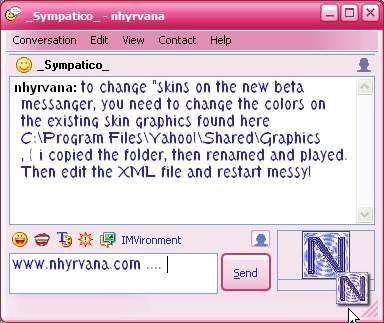
you can play with the skins graphics here > C:\Program Files\Yahoo!\Shared\Graphics

 ~ i just swapped the colors and made sure the magic magenta was in place..... that got me this..... 

and a few edits in the XML file changed the blue tone to my choice of pink.

you can make many more edits in the XML... borders and more.. this was on the fly....

Major tip....

no matter how you make your images, the easiest way to assure the background is transparent correctly...... at least for me..... is to reopen the images in PAINT, then flood fill the background.....  a few issues for me with psp.... if it works for you GREAT... if not try this tip if your getting just a "little pink" around edges.... * or you can try not adding shadows:P 

i make one basic button. and add to it then.... works best for me.... 

good luck!

at this point...i haven't found anyone who knows how to implement the icq and aim icons to show actual aim and icq users.... * there is no way CURRENTLY.

i guess this will come eventually......i understand there is an integration with msn messenger coming when hell freezes over....... actually, what i read in the e-zines is that aol was court ordered to  begin developing a client that  would allow all messengers to interact ( kinda like an official trillian or imici ) but, just fyi, the word from inside the project is that all 3 messy companies (yahoo, msn, aol/icq ) are all taking the " if we didn't develop it, we wont use it" stand point regarding the technology.

 (editorial comment: proprietary stubborn chits )

Rumor has it that if they don't start working together, a client called Bantu will be designated as the tool to interact with all  services. Bantu is already used by military families to instant message securely across all chat messenger services.   time will tell.........

Content and images copyright ©2000-2004 by Nhyrvana ~violators will be spanked

disclaimer/ terms of use: the use, installation, or application of any of the materials, hints, advice here is solely at the risk of the user. this is a personal site, not a business site. nhyrvana will not be held responsible for any resulting damages, loss or other results due to the usage of the material presented here. if you have any doubts, feel free to search the web for other information. use of this site indicates agreement with these terms..... feel the need to help support nhyrvana? then you can donate a dollar

open.your.mindNewbie2Knewbie NewsletterHelp forums and Fun stuffComp and Chat help