| Here is our suggestion ~ use that space your isp gave you to build a page to put your wav file on. before you roll your eyes at me and stomp your feet about not knowing how to build a site, I am not even saying to do that. All you are going to do is upload the wav file to that personal space. So, how do you upload that file fast? just open up Internet Explorer and enter the address to the ftp serverfor example
ftp://www.duh.com ( some isp's may use
ftp://username@www.duh.com ) Put your ISP's name where it says duh , okay? This should pop up a log in box like the picture on the right. enter your user name and log in password for your isp and it should access your webspace provided to you by your isp 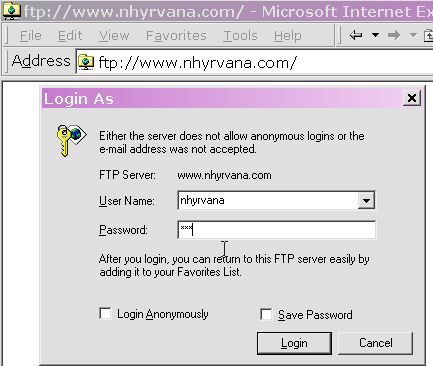
like this one ~ some may have a plain folder, all empty no options, some will have a lot of folders like this one, if the domain is FrontPage enabled or some may just have a web folder.if it has a web folder, go there, otherwise, it should work in the folder that opens. 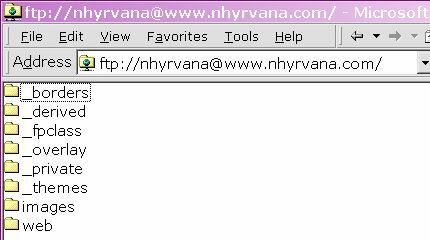
once in there you will see all the files so far uploaded to the server space on your account 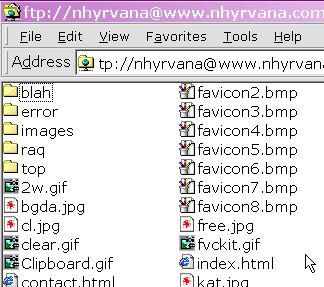
then just click on the MY computer icon on your desktop and browse to find your wav fileand then click and DRAG that file over to the FTP space open in the browser. you should see the copying notice window showing progress of the transfer when its all done just take the URL of the wav file and go to your profile, then enter the URL in the space under edit voice. for example,
/~username/wavname.wav make sure you use your username at isp and the correct wav name. As I said before, this is a last resort if you have no other web space available, because it will put your isp info on the net. be careful and have fun. and thankies to sf49fan
| 