| INSIDE!!!! (missed outside? go here ) okay.this info is thanks to rustedexcaliber this will also take some time....first thing to check . how much RAM are you using? FAST CHECK? log on to net as usual. then right click my comp icon, select properties, then performance > look at number by system resources. (did you just freak at the 19% ? 256 in RAM is worthless if you have a bunch of junk running that you don't need!) track down the RAM hogs..... ( running winME? it has an unresolved bug~ doesn't clear ram once you close a program .... get something like ram idle, rampage or another ram recovery program)
take a look at all the junk sitting down by the clock on your system tray? do you reallllly need all 4 messengers running at once? and real player? and winamp? and ....and.....and....????? so what can you clean from the tray? Any duplicate entries, which can cause system instabilities; anything from Real Networks (usually you'll see the RealPlayer StartCenter); any instant messaging software (unless you're an instant messaging junkie, if so get trillian of jabber ~ one program does it all ); and any jukebox or music software (Napster, for example, stays running in the tray even when you close the main application). Why get rid of these fun things? Because they suck up a lot of resources even when they're not running, and that slows down your work. ( not as much a worry if your all play on the comp, but still resource suckers!) 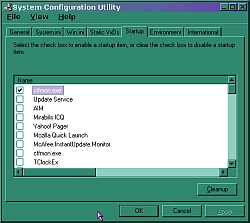 Here's how to turn off system tray programs: Here's how to turn off system tray programs: Place the pointer over each tray icon; the Tool tip will help you determine what application each one represents. To shut them off, click or right-click each icon and select the option that turns it off--usually Exit. If right click doesn't give you a menu, press Ctrl-Alt-Delete, select the name of the program, and click the End Task button. or take a trip to msconfig and keep it from ever starting up with out permission.
wait. not done yet! time to clear the files that are hogging space......
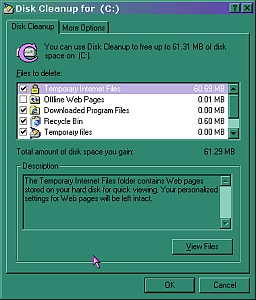 Disk Cleanup does some of the hard drive housework for you: It hunts down and clears out disposable files. open My Computer and right-click the icon for your main hard drive (usually labeled C:). Select the Properties option from the menu. Disk Cleanup does some of the hard drive housework for you: It hunts down and clears out disposable files. open My Computer and right-click the icon for your main hard drive (usually labeled C:). Select the Properties option from the menu.
In the dialog box that pops up, you'll see a pie chart that shows how much disk space you have free. Next to it, you'll see a button labeled Disk Cleanup. Click that button to run the cleanup utility, and Windows will find all of your disposable files--such as cached temporary Internet files, deleted files in the Recycle Bin, and (if you upgraded to this version of Windows from an earlier one) dozens of megabytes of uninstall files. All of those can be deleted to free up disk space: Place a check mark next to each item you're prepared to delete, then click the OK button and let Disk Cleanup do its stuff. Older comp? with no disc cleanup~ make sure to clear your temp files, recycle bin, and temp internet files. disc clean up can also be found on some comps by clicking start, accessories, system tools.... unused programs.  | PCs bought come with installed software often have lots of programs you don't want, and don't need!. The trick is to track 'em down and get rid of 'em. either uninstall via add remove in the control panel, or remove from msconfig. (Who needs all those screen savers?) use windows 95 ? use add /remove programs in control panel. don't forget to clean out any setup files from downloads. you can burn these to a cd if you have a burner... or my fave. upload to yahoo briefcase.
|
the temp files..... 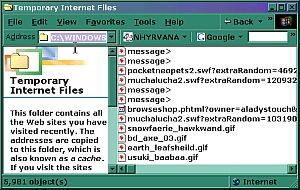 your browser also stores loads of temporary internet files in its cache folder, all of which you wouldn't miss if they disappeared. If you use Internet Explorer 4 or 5, click Tools, Internet Options, click the Delete Files button, and then click OK. You use Netscape, Click Edit, Preferences, expand the Advanced category, and select the Cache option. In the Cache pane that appears, click the Clear Disk Cache button. This can free from 8MB to over 100MB of space used by cached files, depending on the settings you use. take a trip into c\windows\temp internet files and make sure all the cookies are gone too! your browser also stores loads of temporary internet files in its cache folder, all of which you wouldn't miss if they disappeared. If you use Internet Explorer 4 or 5, click Tools, Internet Options, click the Delete Files button, and then click OK. You use Netscape, Click Edit, Preferences, expand the Advanced category, and select the Cache option. In the Cache pane that appears, click the Clear Disk Cache button. This can free from 8MB to over 100MB of space used by cached files, depending on the settings you use. take a trip into c\windows\temp internet files and make sure all the cookies are gone too! |
