search engines rely upon what they have 'spidered', or gone to. if that search engine has not seen the page, it probably will not be listed.
and sometimes it can take weeks, or even months to be listed on a search engine. typically spiders come every 28 days to websites..... if you have constantly new content added you may get freshbot and be spidered daily.... you may also get freshbot if linked on an important or changing site. but, that aside, I have found that the more words you use, then more likely a resulting 'hit' or useful hit is.
for example: lets say you are looking for how to do the new smileys on yahoo - you could type in 'smileys' on google search
and get 204000 entries.. - or try 'yahoo smileys' and narrow it down to 8440 options..
- some which actually are exactly what you want,
- but that is a lot to go through to find that out..
that takes it to 4100 options.. - but if you type 'yahoo smileys cow', you have 182 options,
- you could refine it even more if you desired and reduce the results to even less.
and by looking at the info ( like where the page is)
you can determine if its a helpful page or not. there is the link which will tell you where the page is located and then should be a few lines of info from the page. something like this =o) >>>>>
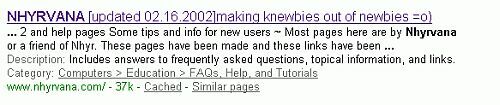 these little tidbits can be used to decide if the page is worth looking at or not, and can aid your search.
but, as I said before, using several words works great for me, and sometimes you may need to look with in the results you get at first for some better key words. ( like yahoo smiles is a bad search for the smileys faces...) you may need to refine your search as well if the results aren't what you need. it happens. something to note as well, the example above is for a google search, - notice the blue word. that's the link to the actual page.
- where that link goes is identified in the green text.
- the text section tells a little about the page, and most important are the cached and similar pages links.
- cached is how the page looked when the search engine looked at it. it has all the text but none of the pics. this can be a great tool if your page goes poof*.
- and similar pages often shows other pages on the same site.
just try a few words, and refine your words if need be, the key to a good search is knowing what words will get what you need, and often, what makes sense to you and I, is not how it will be found. and as always, good luck
|
|
there are a lot of search options out there, some are great,
some are ..well... not so great.
the ones I use most often are www.dogpile.com and www.google.com
a PRETTY one, but so so on effectiveness is KARTOO ~ check it. dogpile actually searches several search engines at once. i really only go to another search engine if those fail ( and so far they haven't~ or when ego surfing =o) yeah i surf for my name occasionally, but just to check if pages are listed, i swear =o) ) HELP! the site i want to look at says page not found! If you use Google to search, cache will be found on the bottom line, after the url, sometimes the date spidered/updated/
and right before similar links.
Cached versions of sites can help you recover a lost site, can help you see
a link that for some reason is down, or let you see (sometimes) what a site
looked like before a recent update. Cached pages are pretty much html only, if the sites server is down, being serviced, or site has been removed for other reasons, the graphics will not load.
|
|
Content and images copyright ©2000-2004 by Nhyrvana ~violators will be spanked disclaimer/ terms of use: the use, installation, or application of any of the materials, hints, advice here is solely at the risk of the user. this is a personal site, not a business site. nhyrvana will not be held responsible for any resulting damages, loss or other results due to the usage of the material presented here. if you have any doubts, feel free to search the
web for other information. use of this site indicates agreement with these terms..... feel the need to help support nhyrvana? then you can donate a dollar
|
