the video is an swf file. and may take a minute to fully load...
this fix also works for web cams that work fine on netmeeting, or other chat servers just fine, but will not work once you try on yah00....
this fix also work for any other of a number of cam problems ~
if it keeps saying cam not found on your system, try this... ( from RR) co to start button, click it, then settings, then control panel. Click on Scanners and cameras. Right click on the cam and see if there is a check in the box to use this WDM device.. usually under events. You can also use the VIDCAP again and under OPTIONS... this time click on VIDEO SOURCE.. make sure the cam you are using is selected. And restart messenger or chat... ( i have a dual purpose cam that will make me have to do this. it steals the "focus".

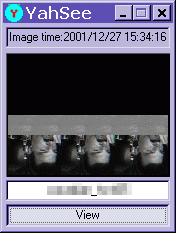 Cam image upside down and in triplicate? no ya haven't been cloned. after hearing this common problem about 900! times. and never hearing a fix..... i went digging...... and despite my best efforts, found no help anywhere for this. (look at the very bottom or page for more info =0) ! ) but i did find one site (which i then lost =o( )that mentioned the vidcap and resolutions if you had static... so i took a jump and tried it with slykk_1 and it worked. so now here it is for every one =o)
  just find the VidCap32 program that came with your cam, (
