YahELite chat client log in fix ~ 

open.your.eyes.open.your.mind....

NewsletterReturn to Index pageForum

YahELite / YChat chat client log in fix ~ 

my version of the fix CL gave to FreeCreed.. but with pics.. cause we all know a fix with pix is best :-)  

Quotes Erik.. "If YChat sits at "Sending login information..." you may need to update your cookie. Do this by clicking on change/ update account and logging in again.
If the rooms list isn't loading, try updating your cookie, or go into the Preferences and change the "Room data server" to something other than the one you have selected." 

To fix the same error on YCHAT client you would hold the cntrl key down, and right click the LOGO on the log in box, then you see a pop up with edit field and edit same as for 'elite.

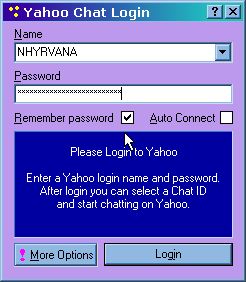
but will leave fix up for those who don't like betas..............or for those who are trying to get vox to work by using old 'elite versions....

Recently ( April 2002)  the  biggY made some changes AGAIN and you need a little tweaking to get in. it can be done tho.. make sure you start with the latest and greatest build available above. this will get you CAPS in your name, the /id tags  but no thinks and emotes~ back stuff up to buttons or replacements, they work fine still.

now... lets start it only takes a minute

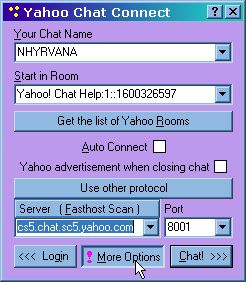
 open up yahelite and enter your chat id as you like it... use UPPER case or lower case or a mix... 

then click on  log in  

when the SECOND log in box comes up ~ select the room to chat in, then click MORE OPTIONS and select the old YCHT protocols.. ( they only have port 8001 and 8002... opposite of what we were using before.

THEN~! 

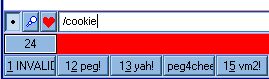
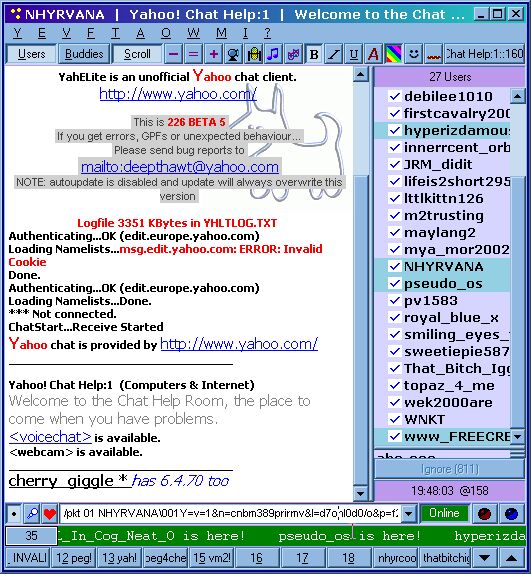
down in the text bar.. type /cookie 

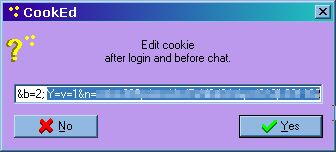
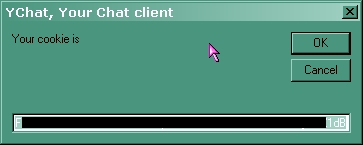
you will get a new pop up box with your cookie info in it...

you want to copy EVERYTHING from the Y=v= on to the very end...

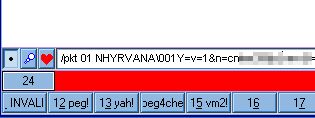
then enter /pkt 01 USERNAME\001

then past the cookie info behind it.

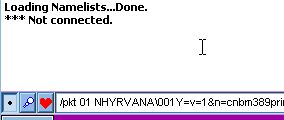
now i click on enter once here. you will get a ***notconnected message if you do so too. but that's okay..

now click the chat button on the log in box 

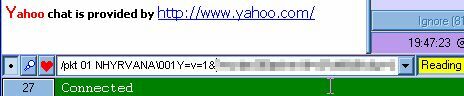
and it should still have the cookie info in the text line..... and say reading ~

so click enter AGAIN to send your new cookie again...

and   ~ all done.. you should be logged in now just fine... i recommend saving that cookie info to a button  and you wont have to do this again on this id :)

Content and images copyright ©2000-2004 by Nhyrvana ~violators will be spanked

disclaimer/ terms of use: the use, installation, or application of any of the materials, hints, advice here is solely at the risk of the user. this is a personal site, not a business site. nhyrvana will not be held responsible for any resulting damages, loss or other results due to the usage of the material presented here. if you have any doubts, feel free to search the web for other information. use of this site indicates agreement with these terms..... feel the need to help support nhyrvana? then you can donate a dollar

open.your.mindNewbie2Knewbie NewsletterHelp forums and Fun stuffComp and Chat help