we all get tired of the plain windows blue background, or the simple textures. if you have an image to use, it it really simple to replace the background. ( no image? check some of the ones we have on the right... or surf the net for some.. )What can you do to modify the look with little or no program use? First, start with your desktop wallpaper. YES ! GET ONE!!
Even a simple fade is better than flat. You look at that thing for
hours a day sometimes, make it pretty and yes, productive can be done
too. Here are a few sample wallpapers we made just for you, click for
a larger image then select set as wallpaper, or save to use. ( these are
mostly 800x600 versions..) make sure to select TILE for the strips or tiles
Added several new
background tiles ~ and some
linkable tiles too and
desktop icons
lets say you are surfing along and find an image to use... if you have the browser open, you can RIGHT CLICK the picture, and should have an option to SET AS BACKGROUND. simple. easy done for many pictures.
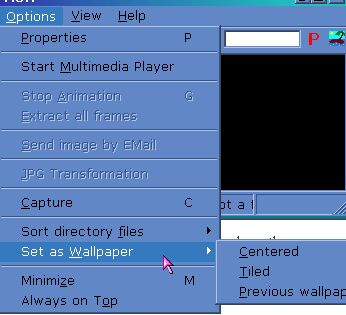
but one of the easiest ways i know to change desktops FAST is using irfanviewer. i drop most pictures i find in my documents/my pictures and irfan has a nice scroll through folder and preview option.. then i can just click on options, and set as wallpaper... tiled or centered.
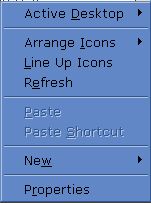
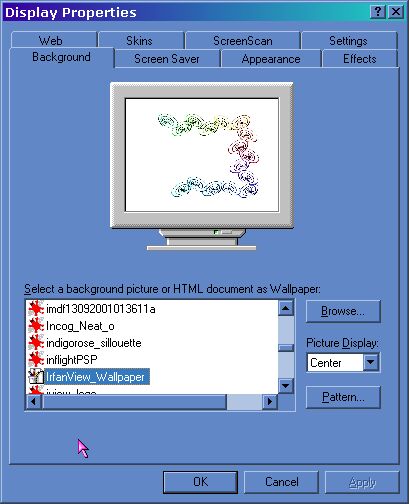
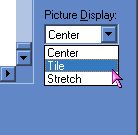
another way? right click your desktop..... select PROPERTIES. then you should see a BACKGROUND tab...... you can scroll through the images on the list, or select to BROWSE. when you find the pic you want, decide if you will tile it, stretch it, or center it.. click apply and ok.... and your all done...
What does your desktop say about you? ~ ( from Newbie2Knewbie issue 18 many more desktop tips there! )
Is it cluttered up with icons? Is it bare as can be? Do you have a wallpaper or none? Do you use a program to modify the look? Or are you an uber-geek and play in the registry to modify your comps look?
We love our friends but.... some of the comments we got were..... " I don't have a wallpaper because I can't find one I like" or " I like a clean desktop, clutter free". Given as much time as these folks spend online we would have expected the ultimate appearance modifications from them. But NOPE! Well, we do LOVE shears idea of the calendar addition to the desktop ~ maybe she will have a page on how to do it soon.
So, what kind of tips and tricks had we expected to see? Honestly ANYTHING but what we saw !!! Some programs you can use to instantly change your look are WindowBlinds and Talisman. WindowBlinds quickly skins your computers 'window screens' with colors, fades, shapes and more. Talisman skins your desktop.. with hidden links and a dozen new toys, it's a desktop that can be fun, and impressive. These two programs do cost though after about 30 days and do have a tendency to suck resources.
If you want to get creative, open any wallpaper in PAINT or a graphics program, add a color block, then paste in a calendar. Then your wallpaper is decorative and productive. okay got that wallpaper up? GREAT, now right click the desktop, select properties, then appearance. You can scroll through the list of pre-made appearances, or go to town customizing, colors, fonts, borders to match your wallpaper. Before you pull your hair out ~ grab a small tool like EyeDropper or ColorCatcher to help you match that blue exactly! So now you look at this new masterpiece and say.. yeah, I like this..... then you realize that the pattern of the wallpaper doesn't quite match the background! So you have this square around your icon text, what to do? Grab this small program, Transparent42. Use the correct one according to the read me file, only takes a few seconds to download and install. We drop it in start up so we never have to think about it. Want to change the icons? Grab a tool like
MICROANGELO ( shareware) to just right click and change icons ~
But wait! you wanna be an uber-geek? then head to virtualplastic they have serious desktop mod on the mind. Registry tweaks, and more.. virtual plastic has tons of ideas and tools! Desktop mod just isn't enough for you? Check what some of these folks did with a blowtorch, glue gun and a few thousand bucks or less........ Casemods ~ a few mirrors, some fake fur .. and neon... Too much?